
Best Free Background Remover Tools in 2026
Removing backgrounds from images has never been easier thanks to AI-powered tools. Whether you're editing product photos, creating social media graphics, or enhancing personal images, the right tool can save time and deliver professional-looking results. In this guide, we explore the best free background remover tools available and compare their features to help you choose the right one.
Top Free Background Removal Tools
Several online tools offer effective background removal with varying features, limitations, and pricing models:- Backgroundless – Unlimited usage, no watermarks, and fully browser-based for maximum privacy.
- Picturando Remove Background - Unlimited usage, no watermarks, and fully browser-based for maximum privacy. Plus AI version that let you Remove backgrounds from your images instantly with AI-powered editing (try here)
- Remove.bg – High-quality AI results; free plan includes one low-resolution image per month.
- Pixlr – Integrated into a full photo editor; offers a few free removals daily without watermarks.
- Fotor – Allows up to three free removals per day with additional editing tools included.
- Adobe Express – Limited free usage; premium plan unlocks unlimited removals.
- PhotoRoom – Mobile-friendly tool with daily limits; free exports include watermarks.
- Erase.bg – Offers high-resolution downloads at no cost, supporting people, products, and animals.
- Digital Toolpad – Fully browser-based AI remover with zero data retention and strong privacy focus.
- Vecteezy – Up to 20 free removals per day with transparent PNG downloads and no watermarks.
- Freepik – Fast and accurate AI cutouts, ideal for marketing and social media use.
What Is Picturando Background Remover?
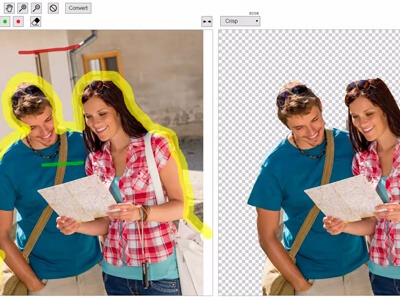
Picturando is a browser-based AI tool designed to remove image backgrounds quickly and without complexity. Unlike many competitors, it emphasizes simplicity and manual control rather than relying entirely on automation.Key Features
- No signup required
- Works directly in your browser
- Supports PNG, JPG, WebP, and BMP formats
- Adjustable settings (color threshold, feathering)
- Instant preview and download
How it works? Video tutorial
Picturando vs Other Background Removal Tools
1. Picturando vs Remove.bg
Remove.bg is one of the most popular tools, known for speed and automation. Pros:- Highly accurate AI detection
- Excellent for portraits
- Fast processing
- Free downloads are low resolution
- Paid credits required for HD images
- Limited manual control
2. Picturando vs Canva
Canva integrates background removal into a full design platform. Pros:- All-in-one design tool
- Templates for social media and marketing
- Beginner-friendly
- Background remover requires a Pro plan
- Less precise edge refinement
3. Picturando vs PhotoRoom
PhotoRoom is widely used for e-commerce and product photography. Pros:- Optimized for product images
- Includes templates and AI-generated backgrounds
- Batch editing capabilities
- Many features behind a paywall
- Can feel complex for beginners
4. Picturando vs Pixlr
Pixlr is a free browser-based editor with background removal functionality. Pros:- Free and accessible
- Includes a full editing toolkit
- Less accurate AI detection
- Limited fine-tuning options
When Should You Use Picturando?
Picturando is a great choice if you:- Want a free background remover with no login
- Need quick edits without complexity
- Prefer manual control over AI decisions
- Work with simple or moderately complex images
Limitations of AI Background Removers
Even the best tools—including Picturando and its competitors—have limitations:- Difficulty handling fine hair or fur
- Issues with transparent objects
- Challenges when subject and background have similar colors
Best Background Remover: Final Verdict
Each tool has its strengths, and the best choice depends on your needs:- Picturando → Best for free, fast, no-login editing<. You can use the free and easy version, or the more advanced version with AI remover tool/li>
- Remove.bg → Best for automation and accuracy
- Canva → Best for integrated design workflows
- PhotoRoom → Best for e-commerce and product photos
- Pixlr → Best for general editing with background removal